Old school computer nerds carried around floppy disks to store their programs on.
The floppy disk got replaced by USB flash drives they look like this:
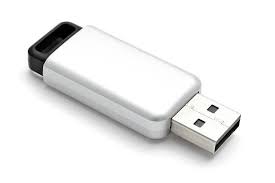
They cost about $10 and go up from there.
The more storage capacity the greater the price, my folder(yhsWP) that has
all the subfolders to the Los Mineros Page is about 200 MB, easily fits on smallest
capacity flash drive. Open up Microsoft Edge(Google Chrome will not do) and copy
this in the URL while connected to a wired LAN connection on the YHS campus:
file://yhs-fs/Apps/Users/bba
copy the yhsWP file to your flash drive. Plug it into your USB Port HomeComputer/ChromeBook. Open up the yhsWP folder scroll down and open the “index” file and as the French say “Voila, Los Mineros”
Do the following at school over the YHS LAN:
Type in the following in Microsoft Edge Browser's URL: file://yhs-fs/Apps/Users/bba
It will bring up a folder showing the yhsWP folder. Sign into Google Drive, drag the
yhsWP folder into your Google Drive.
Do the following on your home computer on WWW (Way 2):
Sign into Google Drive, right click the yhsWP folder and choose download. It will downlaod the folder
as a zipped folder.
After download is complete go into your download folder and right click on your
yhsWP - 20200113T184643Z-001 zip folder and choose > 7-Zip
(you have to download this free program if you don't have it)
next choose > Extract Files and Choose where on your computer you wish to extract:
C:\Users\BillyBob\Downloads
Open up your extracted folder yhsWP - 20200113T184643Z-001 and yhsWP folder and then index file and it will open up my Los Mineros Page.
Do the following on your home computer on WWW (Way 3):
Click on the shareable link: shareable link
It will open up shared file in your Google Drive, at the top it will have: Shared with me > yhsWP If you want all classes with Los Mineros Opening Page: Right click on the yhsWP folder choose download. If you want just your class(i.e. Computer Skillz): open up yhsWP folder right click on the following folder depending on what class you are in and choose download:
Computer Skillz: csz
Web Design 1: HTML
Web Design 2: HTML5
Computer Programming: JavaScript
When download is complete at the bottom of the screen, click the show all button click on Show in folder link: right click on your csz - 20200113T184643Z-001 zip folder and choose > 7-Zip (download this free program if you don't have it) next choose > Extract Files and Choose where on your computer you wish to extract:
C:\Users\BillyBob\Downloads
Click the OK button. Open up your extracted folder: csz - 20200113T184643Z-001, scroll down and open up the “index” file. Work on your labs just like you do in class, this class was already set up to do remote on-line learning so it is business as usual.